Digitalising public-sector staff management: automated timekeeping and payroll by funding source
Minh Khoa
Founder & Tech Lead
A familiar problem in public service units
In many Vietnamese hospitals, schools and health centres, monthly payroll still works like this:
- ✓Each department records attendance on paper or in its own spreadsheet and sends it to HR at month end
- ✓HR collects everything and checks it against duty rosters, leave requests and pay-raise decisions
- ✓The finance team calculates salaries, allowances and additional income in a many-sheet Excel file full of nested formulas
- ✓Finally, salaries must be split by funding source: how much comes from the state budget, how much from the unit's own service revenue (hospital fees, tuition) and how much from other services
One wrong cell, or a pay coefficient not updated after a promotion, and the whole payroll has to be redone. Every time the base salary changes (for example to VND 2,530,000 per month from 1 July 2026), accountants spend days reviewing and calculating back pay.
Why is public-sector payroll hard to automate?
Payroll software built for private companies usually does not fit, because public employee pay has its own rules:
- ✓Coefficient-based pay: salary = pay coefficient × base salary, with allowances also calculated by coefficient or percentage
- ✓Many allowances: position, seniority beyond the top grade, years in the profession, sector incentives, responsibility, hazardous work, on-call duty, surgery and procedures...
- ✓Periodic grade raises: each person has a different raise date
- ✓Additional income paid under the unit's internal spending rules, often based on monthly or quarterly performance ratings
- ✓Multiple funding sources: the state budget, service revenue and other income, each accounted for and reported separately
A suitable system has to understand these rules, not just "hours × hourly rate".
What can a staff management system do?
1. One central staff record
Each employee has a digital record: grade, step, coefficient, position, current allowances, work history and pay-raise decisions. The system reminds HR before a grade raise is due, so no one has to check a logbook.
2. Automatic timekeeping
- ✓Data comes from fingerprint or face-recognition terminals or location-checked mobile check-in, not manual entry
- ✓Linked to duty rosters and shifts: hospitals have day shifts, night shifts and 24-hour duty, and the system calculates attendance and duty pay for each one
- ✓Leave, business trips and training are approved in the system and applied to the timesheet automatically
- ✓Heads of department approve their department's timesheet in the software, with no paper passed around
3. Payroll calculated by the unit's own rules
The accountant sets everything up once: the base salary, how each allowance is calculated, and the additional-income formula from the internal spending rules. From then on the system calculates payroll every month.
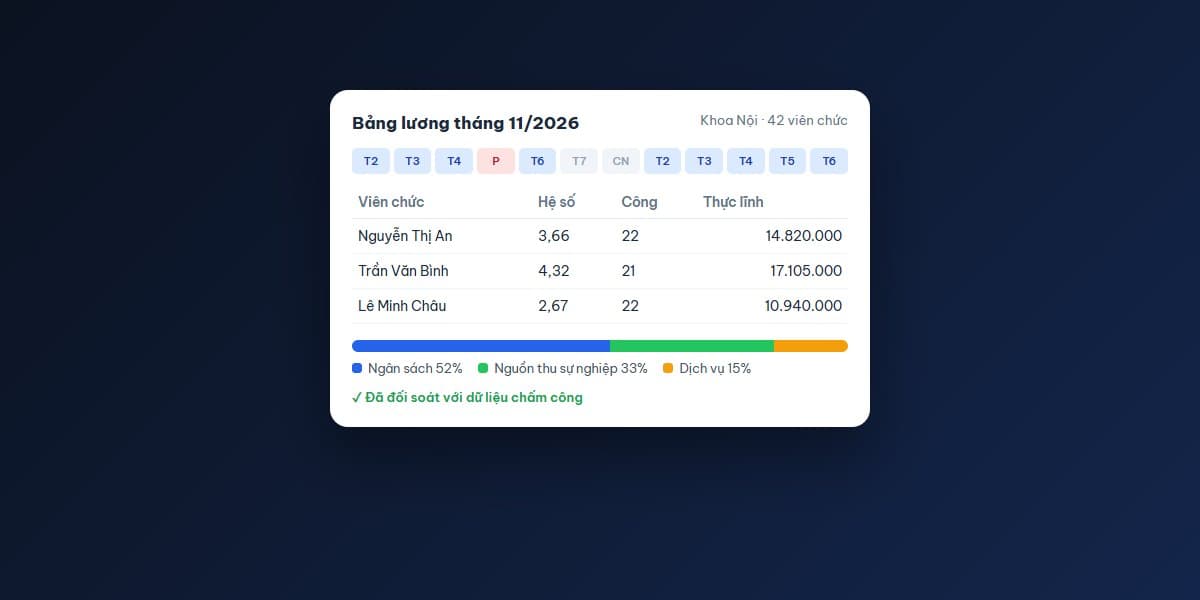
For example, an employee with a coefficient of 3.66 and a base salary of VND 2,530,000 earns 3.66 × 2,530,000 = VND 9,259,800 in coefficient pay. Allowances, additional income, social insurance and personal income tax are added or deducted automatically by the configured rules.
When the base salary changes, you edit one number. The system recalculates everything and produces back-pay sheets if the change applies to earlier months.
4. Payroll split by funding source
This is where many units spend the most effort. The system lets you define:
- ✓Which source each salary or allowance item is paid from
- ✓Or a split by ratio, for example a department paid 60% from the budget and 40% from service revenue
- ✓Additional income paid from the unit's surplus of revenue over expenses
At month end you have payroll sheets split by source, matching how the finance team posts entries and prepares reports.
5. Reports and integrations
- ✓Payroll sheets, allowance payment sheets and bank transfer lists
- ✓Social insurance and personal income tax reports
- ✓Total salary fund by department and by funding source
- ✓Employees view their payslips on their phones, cutting down questions to the finance team
- ✓Data export to the accounting software the unit already uses
Visible benefits
- ✓Payroll time cut from several days to a few hours of review
- ✓Fewer errors from manual entry and spreadsheet formulas
- ✓Transparency: employees know how their pay is calculated and managers can see the salary fund at any time
- ✓Ready for policy changes: a new base salary or new internal rules is just a configuration change
- ✓Centralised data for reporting to the supervising authority
How is it rolled out?
1. Process review: work with HR, finance and a few representative departments; collect the internal spending rules and current payroll templates
2. Rule configuration: set up coefficients, allowances, funding sources and additional-income formulas
3. Parallel run: for one or two months, calculate payroll in both the new system and the old way and compare person by person
4. Go-live and user training in each department
5. Post-launch support, with updates when policy changes
Note: the base salary, allowances and financial mechanisms in this article reflect the regulations at the time of writing. In a real project, every calculation rule is checked against current regulations and the unit's own internal rules.
How can DankTech help?
The DankTech team has built and operated HR, timekeeping and payroll (HRM) systems for large companies and for healthcare and hospital projects. We understand how a payroll with many funding sources and allowances works in practice.
If your unit wants to move away from spreadsheets and paper timesheets, see custom software development, digital transformation consulting or contact us for a free assessment.